Working from home in a small apartment is a specific kind of challenge. You need a setup that actually supports focus and productivity, but you are also living in the same space, which means the desk cannot look like a tech showroom explosion by 6pm. The best work from home desk setups in small apartments do both: they function during work hours and they integrate into the home during the rest of the day.
We have thought hard about this one, because we live it. Here is what we have learned about creating a home desk setup that genuinely improves your productivity without taking over your home.
Choosing the Right Location in a Small Apartment
Before anything else, location. The biggest mistake in small-space home office setups is choosing the wrong spot and then trying to compensate with equipment. The right spot makes everything easier.
Natural Light First
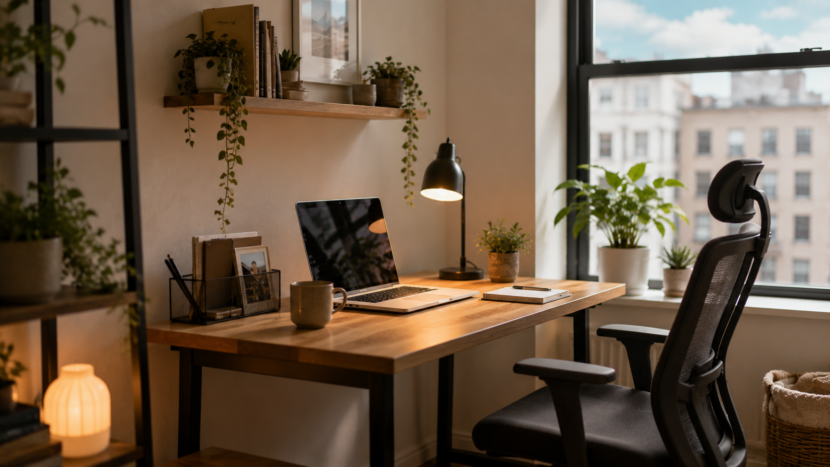
Position your desk to get natural light from the side rather than directly behind or in front of your monitor. Behind causes glare, in front causes you to look into the light all day. Side light is flattering for video calls and better for sustained focus. If your only window option is directly behind the desk, a good blind that diffuses rather than blocks light helps significantly.
Creating a Psychological Separation
In a studio or open-plan apartment, psychological separation between work and life is important for both productivity and rest. A desk that faces a wall rather than the room creates a subtle boundary. A room divider, bookshelf, or curtain behind the desk reinforces it further. When the workday ends, closing a curtain or turning the chair away from the desk helps the brain shift modes.
The Desk Itself
Size and Shape
For most apartment desk setups, a desk between 100-140cm wide is the sweet spot. Wide enough to hold a monitor, laptop, and a few essentials without crowding. Narrow enough to fit in most spaces without dominating a wall. Avoid L-shaped desks unless you genuinely need the surface area as they are hard to integrate into small spaces.
For very limited space, a wall-mounted fold-down desk is genuinely underrated. IKEA’s NORBERG (£50) folds flat when not in use and creates a proper work surface when needed. Combined with a wall-mounted monitor arm, this creates a full work setup that disappears completely outside working hours.
Height Matters More Than You Think
Desk height should allow your elbows to sit at approximately 90 degrees when typing. For most people this is 71-76cm. Adjustable-height desks are worth considering if budget allows because standing occasionally during the day significantly reduces fatigue and back pain in longer work sessions. Budget sit-stand desks start around £200 and are a genuine productivity investment.
The Monitor and Screen Setup
If you work from a laptop, the single biggest productivity upgrade available to you is an external monitor. Working from a second, larger screen reduces eye strain and window-switching fatigue significantly. A 24-27 inch monitor positioned at arm’s length and eye level is the ergonomic standard.
A monitor arm (from £25 on Amazon) moves the monitor off the desk surface, freeing up the entire surface below it and allowing proper height adjustment. This is one of the most impactful small changes in any desk setup.
Ergonomics: The Unsexy Productivity Factor
Chair
The chair is the one place we always advocate spending more than feels comfortable because you sit in it for 6-8 hours a day. A genuinely supportive chair with adjustable lumbar support, seat height, and armrests dramatically reduces fatigue and back pain. The IKEA MARKUS (around £200) is consistently recommended as the best budget ergonomic chair. Second-hand office chairs on Facebook Marketplace are often excellent value, particularly Herman Miller, Humanscale, or Steelcase models that have been sold off by offices.
Keyboard and Mouse
If you use a laptop on a stand with an external monitor, a separate keyboard and mouse keeps wrists in a neutral position. A keyboard at 71-76cm height and a mouse that fits the hand without reaching are both important for comfort over long sessions. Budget wireless keyboards and mice from Logitech are reliable and cost around £30-50 for both.
Lighting for Video Calls and Focus
Overhead lighting looks terrible on video calls. A lamp positioned to your side or slightly in front of you at face height provides the flattering, even light that makes video calls look professional. A ring light (£20-40) placed at monitor height is the dedicated solution. A warm desk lamp positioned to the side of the monitor works almost as well and doubles as ambient lighting for the rest of the room.
For broader lighting ideas for your apartment, see our guide to cozy living room lighting.
Cable Management: The Difference Between Chaos and Calm
Nothing makes a desk look more stressful than cable chaos. A few inexpensive solutions eliminate the problem completely: cable clips adhesive-mounted to the back of the desk (£5 for 20), a cable management box to hide the power strip (£15-25), and cable ties or velcro wraps to bind cables together. One hour spent managing cables transforms the desk from a visual source of stress to a calm workspace.
Making the Desk Feel Like Part of the Home
One Good Plant
A small plant on the desk, a trailing pothos, a compact succulent, or a ZZ plant, softens the workspace and has been shown in multiple studies to reduce stress and improve focus slightly. Keep it small enough that it does not intrude on the work surface. A plant in a terracotta pot adds warmth and the organic quality that prevents a desk from looking like a sterile office corner.
A Tray to Contain the Desk
A small tray or organiser on the desk surface contains the inevitable daily items: a pen, notepad, charger, lip balm, sticky notes. Items in a tray look organised. The same items scattered across a surface look like clutter, even if the quantity is identical.
Art Above the Desk
A print or small piece of art above the monitor gives video call backgrounds character and makes the desk feel like a designed space rather than a functional necessity. This is also the most visible part of your setup to anyone on a video call, so choose something that reflects how you want to be seen at work.
For ways to keep the broader space calm and functional, see our guide to small space storage ideas and our home office ideas guide.
The Budget Work From Home Desk Setup: What We Would Buy
For under £300 total, a genuinely functional and attractive home desk setup: IKEA MICKE desk (£90), a second-hand ergonomic office chair from Facebook Marketplace (£50-100), a 24-inch monitor (£100-150 used), a monitor arm (£25), adhesive cable management clips (£5), a small terracotta plant and pot (£8), and a warm desk lamp (£20-30). This is a complete, ergonomic, good-looking setup for the cost of one month’s gym membership.
Final Thoughts
The best work from home desk setup for a small apartment is the one that supports your actual work, integrates into your home life, and does not make the apartment feel like an office. Natural light, proper ergonomics, clean cables, warm materials, and one plant are the non-negotiables. Everything else is refinement.
Start with the chair and the lighting. Get those right first and everything else improves around them.
Will it actually fit?
Use our free furniture planner — enter your room size and see exactly which pieces fit, with layout tips for your space.